
One real DOI taken apart, four places to find one, how it differs from a PMID, a PMCID and a URL, and what APA and MLA ask for.
A DOI, or digital object identifier, is a persistent identifier for a published work such as a journal article, book chapter or dataset. Every DOI begins with “10.” It has a prefix and a suffix separated by a slash. Written as a link that starts https://doi.org/, it gives a persistent link to the work online. APA and MLA both prefer a DOI to a URL.
By Dr. Rajni Garg, Executive Lead, Research & Content Strategy, AnswerThis
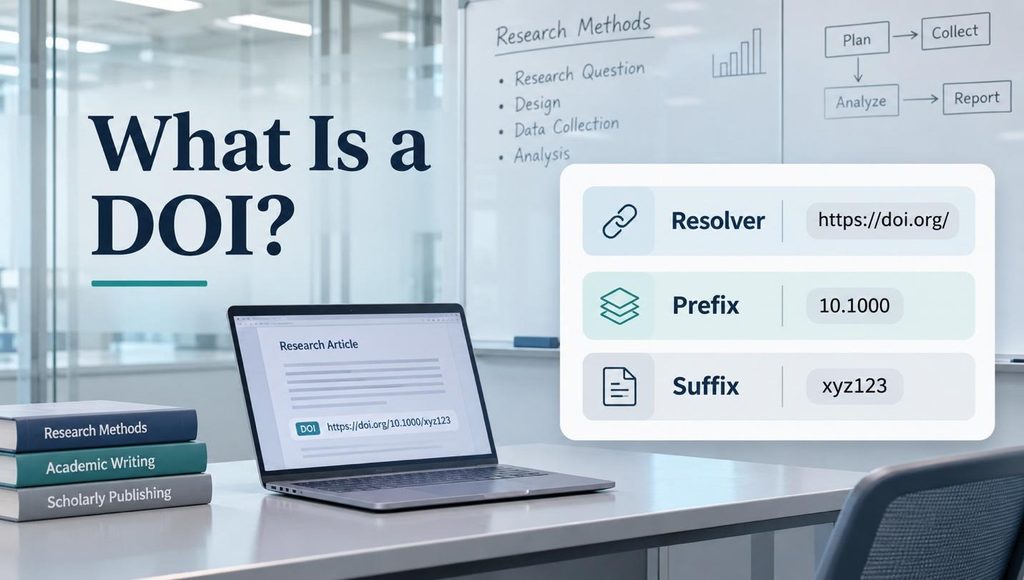
What is a DOI, and why does it outlast a URL?
A URL tells you where one copy of a work sits today. A DOI names the work itself. Crossref describes a DOI as “an opaque, persistent, digital identifier” that is “used to identify a unique content item and its location online”. The same document lists book chapters and datasets among the things a DOI can identify, not only articles.
The difference shows when a site changes. If the location of a publisher’s landing pages or full text changes, Crossref asks its members to “Update your resolution URLs”. The DOI then sends readers to the new address while an old URL breaks. The identifier itself never moves: “Because DOIs are designed to be persistent, a DOI string can’t be changed once registered, and DOIs can’t be fully deleted”.
New York Tech Libraries records that the system dates back to 1998, when it “was initiated by the International DOI Foundation”. DataCite announced the registration of its 100 millionth DOI on 20 October 2025. On 26 October 2026, Crossref’s statistics page listed 189,517,760 total records, 126,869,120 of them as journal DOIs.
Anatomy of a DOI: the prefix, the slash and the suffix
The DOI of an open-access study of diet and dementia risk in BMC Medicine has been written as a link:
https://doi.org/10.1186/s12916-023-02772-3
Read it from left to right.
- https://doi.org/ turns the DOI into a link that resolves to the work’s current page.
- 10.1186 is the prefix. According to DataCite, “DOI Basics”, “A DOI prefix always starts with ’10.’ and continues with a number”. For Crossref DOIs, the prefix is assigned by Crossref.
- The slash (/) separates the two parts.
- s12916-023-02772-3 is the suffix, assigned by the publisher. Do not try to read meaning into it. Crossref, “Constructing your DOIs” says suffixes are “essentially meaningless on their own and meant to be that way”. DataCite notes that “DOI suffixes are not case sensitive.”
Where to find a DOI: the article page, the PDF, the database record or a lookup tool
Start with the work itself. Walden University Library advises that “The first place to look for a DOI is the article itself,” and “Many publishers will include the DOI somewhere on the first page of the article”. Check the publisher’s article page near the title, then the first page of the PDF.
Next, check the database where you found the work. University of Toronto Libraries cautions that “DOIs can also be found in database search results” and in the full record for each item.
If neither shows a DOI, use a lookup. Walden also notes, “You can look for a DOI using the Crossref website.” Crossref, “Simple Text Query” lets you “retrieve DOI names for journal articles, books, and chapters” by pasting a reference or a whole reference list. If all you have is a title or half a reference, the AnswerThis Citation Finder searches Crossref and PubMed records from a title, DOI or PMID, and it warns that some papers have no DOI at all. Either way, check that the match is your source before you copy the DOI.
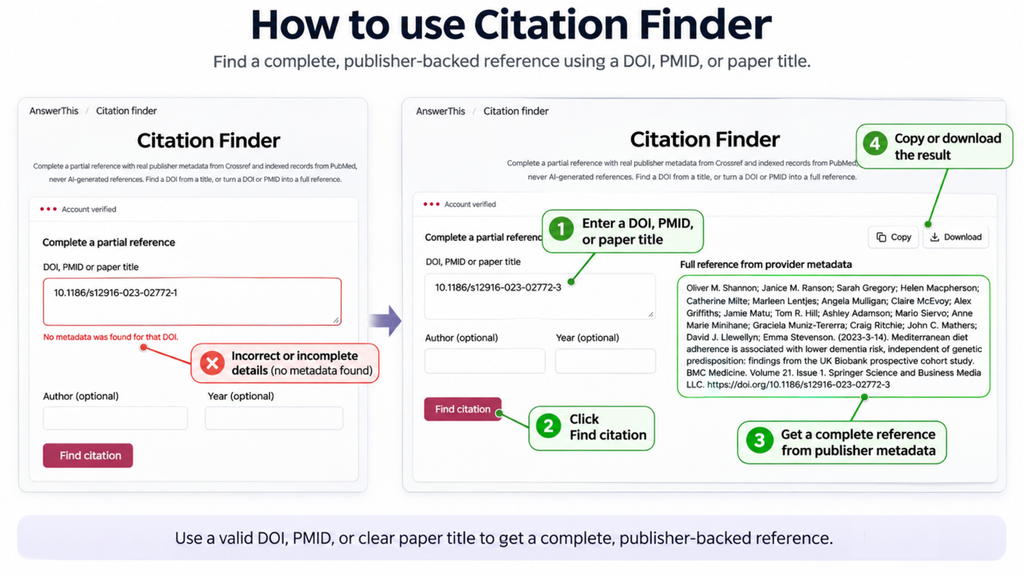
Figure 1. The lookup form on the AnswerThis Citation Finder, which takes a DOI, a PMID or all or part of a title. Screenshot: AnswerThis Citation Finder.
Figure 1 alt text: Screenshot of a form headed Complete a partial reference, with a box for a DOI, PMID or paper title, optional author and year fields, and a Find citation button.
DOI, PMID, PMCID or URL?
Health and life sciences papers often carry several identifiers. The table below is my own summary for the study above, with PMID and PMCID wording from the PMC FAQs, National Library of Medicine.
| Identifier | What it identifies | Example |
|---|---|---|
| DOI | A unique content item and its location online | 10.1186/s12916-023-02772-3 |
| PMID | A citation record in PubMed | 36915130 |
| PMCID | A full-text article in PMC | PMC10012551 |
| URL | The address of one web page, which can change | https://bmcmedicine.biomedcentral.com/articles/10.1186/s12916-023-02772-3 |
A PMID tells you the work has a PubMed record, and a PMCID tells you the full text is in PubMed Central. In APA and MLA reference lists, the DOI is the identifier to use when a work has one.
How to cite a DOI in APA and MLA, and what to do when there is none
Both styles want the DOI as a full link. Crossref, “Display guidelines” say DOIs should “always be displayed as a full URL link in the form https://doi.org/10.xxxx/xxxxx” and “not be preceded by doi: or DOI:”.
APA Style, “DOIs and URLs” rules are short: “Include a DOI for all works that have a DOI, regardless of whether you used the online version or the print version.” “If an online work has both a DOI and a URL, include only the DOI.” “Do not add a period after the DOI or URL because this may interfere with link functionality”. The old label is gone too. According to APA, guide to what’s new in the seventh edition, “The label “DOI:” is no longer used before a DOI”. The study above therefore ends its APA reference like this:
BMC Medicine, 21(1), Article 81. https://doi.org/10.1186/s12916-023-02772-3
MLA 9 agrees on the form: “A DOI should be preceded by “https://doi.org/” (5.93)”.
When there is no DOI, the two styles part ways. APA says: “For works without DOIs from most academic research databases, do not include a URL or database information in the reference because these works are widely available.” For a library database article, MLA sets an order: “the location, in order of preference, is the DOI, permalink, or URL”.
For a list of DOIs, the AnswerThis DOI to APA converter turns each one into an APA 7 reference from Crossref or DataCite metadata. Compare each returned title with the work you meant to cite, and write the in-text citations yourself.
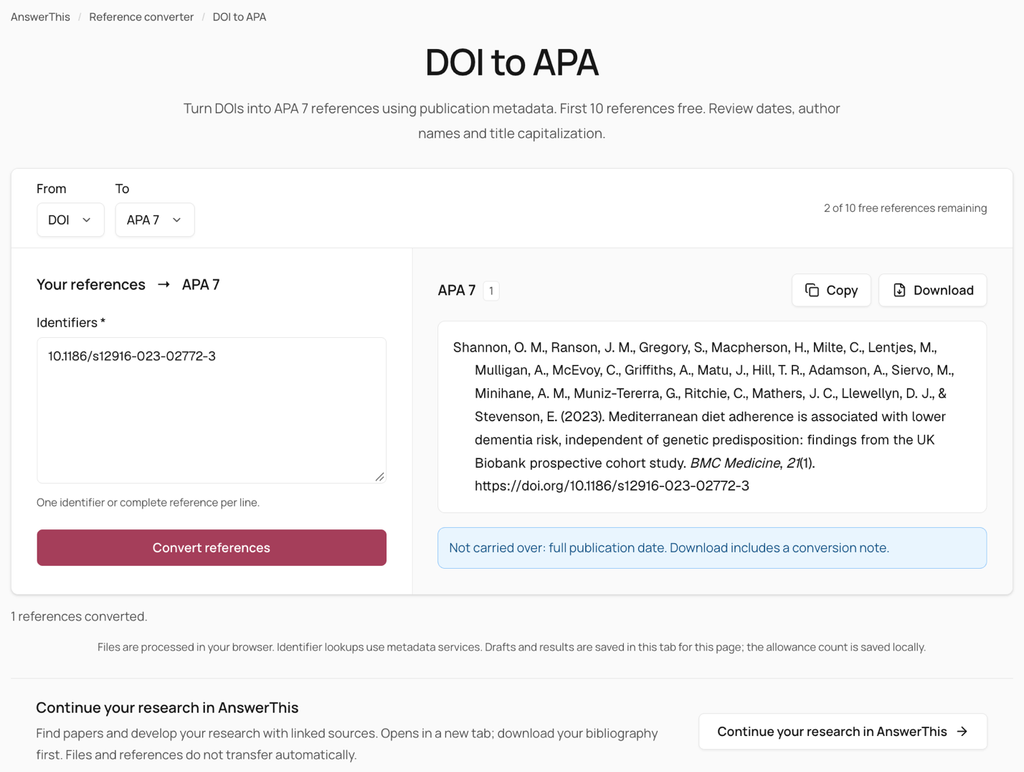
Figure 2. The DOI from the anatomy section, converted to APA 7 by the AnswerThis DOI to APA converter. Screenshot: AnswerThis DOI to APA converter.
Figure 2 alt text: Screenshot of a DOI entered on the left and, on the right, the APA 7 reference it produced for the BMC Medicine study, ending with the DOI link.
FAQs
What is a DOI number?
A DOI number is a digital object identifier: a persistent identifier for a published work such as a journal article, book chapter or dataset. It always begins with “10.”, has a prefix and a suffix separated by a slash, and works as a link when written after https://doi.org/, taking readers to the work’s current location online.
How do I find the DOI of an article?
Look on the article itself first, usually near the title on the publisher’s page or on the first page of the PDF. If it is not there, check the record in the database where you found the article. If neither shows one, paste the reference into Crossref’s Simple Text Query, then confirm that the match is the right work.
What should I do if an article has no DOI?
Cite it without one. In APA 7, an article from most academic research databases needs no URL or database name in the reference. In MLA 9, use the next location in order of preference, a permalink and then a URL. Never make up a DOI to fill the gap.
About the author

Dr. Rajni Garg is Executive Lead, Research & Content Strategy, in the Research & Development Department at AnswerThis, a research platform for students and researchers. She has tutored research methodology for graduate students and research scholars, and has guided students at every level, from undergraduate to doctoral, through dissertations, theses and reports.
Disclosure: The author is affiliated with AnswerThis, a research software platform referenced in this article.
